
Teachino changelog
Custom grading scheme & grade export
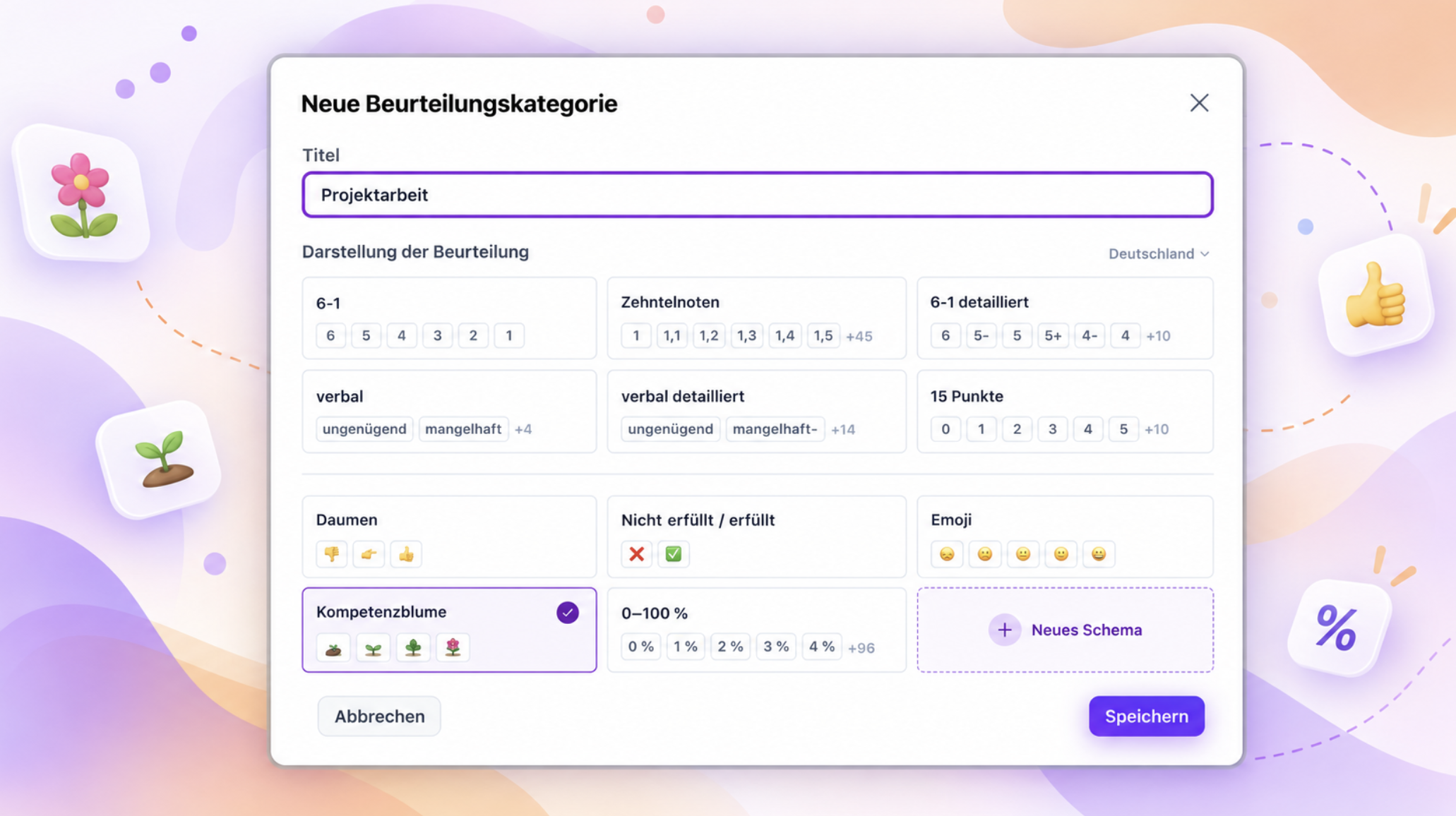
With our new update, grade documentation in Teachino becomes as individual as your teaching.
✏️ Whether it's + / o / - or ☀️ 🌤️ 🌧️: from now on you create your own grading scheme, with as many levels as you need. Once it's set up, you can copy it to all your other courses with a few clicks.
🌱 You can of course use our templates too. New is the competence flower: in four steps, from seed to blossom 🌷, you show how much your students have already grown.
📤 New: You can now also export your grade documentation as a file.
We'll show you how to set everything up tomorrow, live in the free webinar "Grades & Assessments" or step by step in the help center.
🔒 More security for your account
Because grades are sensitive data, you can now also protect your account with two-factor authentication . You'll find it in your profile settings at the bottom left.
More improvements:
Materials
Tasks and images in materials are now numbered consecutively. That way you can simply refer to "Task 3" or "Image 2" in class.
The images in your materials are now even better: the AI suggests suitable, verified images, maps and diagrams with source information.
AI assistant
Many small improvements make the AI assistant work more reliably and tell you more clearly what it has done.
If content could be lost during an AI revision, your existing material is kept and you get a notice.