
Teachino changelog
Changelog
Die neuesten Releases und Verbesserungen von Teachino.
Die neue KI-Assistenz
Ab sofort hast du eine persönliche KI-Assistenz an deiner Seite – zu finden unten rechts in Teachino ✨. Sag oder schreib ihr einfach, was du brauchst: Unterricht planen, Material erstellen, To-Dos verwalten oder eine Erinnerung setzen. Sie löst damit nach und nach alle bisherigen KI-Funktionen für Lehrkräfte in Teachino ab.
Mehr Details dazu findest du im Video oben.
Link für Schüler:innen & Notenschnitt
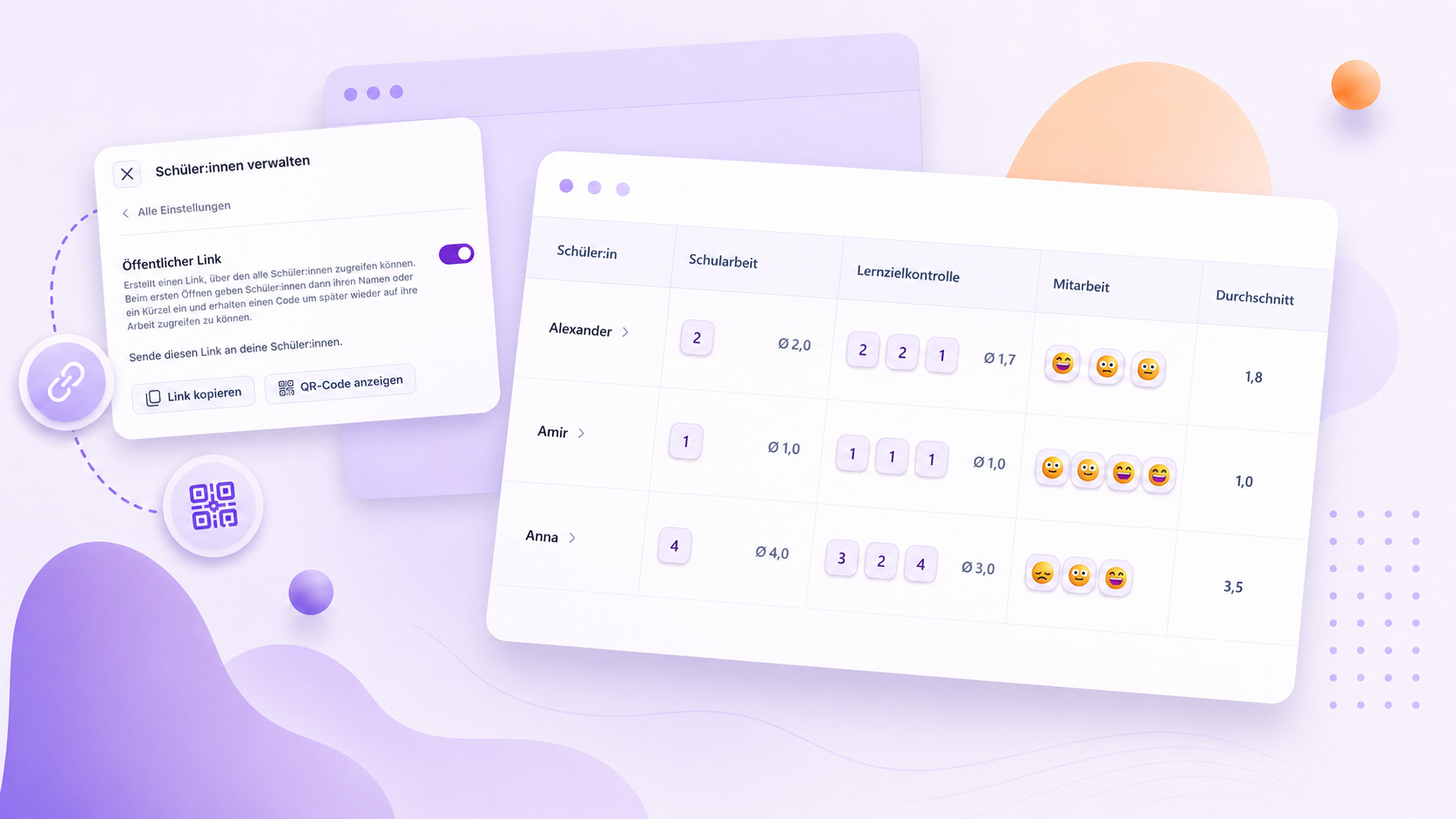
🔗 Einfacher Zugang für Schüler:innen per Link
Du kannst Material jetzt wieder ganz unkompliziert mit deinen Schüler:innen teilen - über einen öffentlichen Link oder einen QR-Code. Du musst dafür vorher keine Schüler:innen anlegen und auch keine Zugangscodes verteilen. Deine Schüler:innen legen sich beim ersten Öffnen selbst mit ihrem Namen oder Kürzel an. Wie das funktioniert, zeigen wir dir hier im Hilfecenter oder direkt hier im Video:
📋 Noten gewichten & Durchschnitt berechnen
Uns hat mehrfach der Wunsch nach einem Notenschnitt inklusive Gewichtung erreicht. Diesen Wunsch haben wir ebenfalls direkt umgesetzt. Wie du das Ganze einstellst, zeigen wir dir Schritt für Schritt hier im Hilfecenter.
Digitales Register: Schüler:innen synchronisieren
Analog zu WebUntis können Schüler:innen jetzt aus dem Digitalen Register nach Teachino synchronisiert werden. Damit wird die Einrichtung eines Kurses deutlich einfacher:
Keine doppelte Pflege: Schüler:innen müssen nicht mehr zusätzlich in Teachino angelegt werden.
Keine Zugangscodes mehr: Schüler:innen öffnen Teachino direkt über das Hauptmenü im Digitalen Register und werden automatisch angemeldet.
So funktioniert’s: Öffne einen mit dem Digitalen Register verbundenen Kurs und wähle „Kurs bearbeiten“ → „Schüler:innen verwalten“ → „Schüler:innen synchronisieren“.
Neue Integration & Verbesserungen
Dieses Update bringt eine neue Integration und viele kleinere Verbesserungen im ganzen Produkt:
Edupage
Deine Schule nutzt Edupage? Dann haben wir gute Nachrichten! Der Stundenplan kann jetzt direkt nach Teachino übernommen werden. Gehe dazu auf “Profil” > “Integrationen” > “Edupage” und folge den beschriebenen Schritten.
Neuigkeiten bei der Planung
Die Ansicht “Planung” ist nun auch für Kurse aus vergangenen Schuljahren sowie für gelöschte Kurse verfügbar. Damit kannst du alte Planungsdaten jederzeit nachschlagen und bei Bedarf exportieren oder ausdrucken.
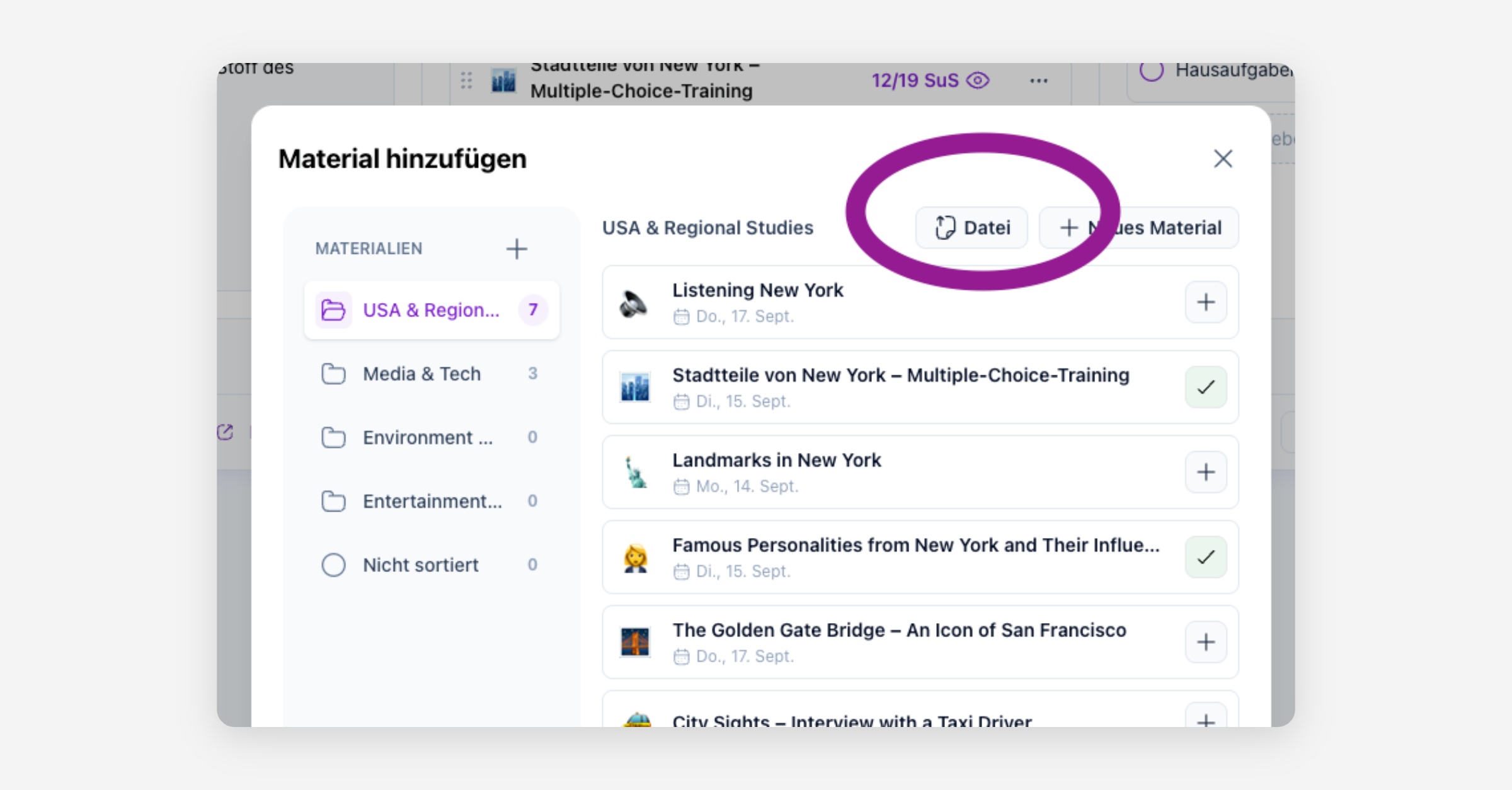
Sowohl im Stundenplan als auch auf der Ansicht “Planung” können Dateien jetzt direkt über den Button “+ Datei” hochgeladen werden. Der “Umweg” über “Neues Material” ist nicht mehr notwendig.
Nicht erledigte To-dos werden jetzt automatisch ganz oben in To-do-Listen angezeigt. Klickst du im Stundenplan auf den Abschnitt „To-dos“, wird der Cursor automatisch gesetzt, sodass du direkt ein neues To-do eingeben kannst.
Fehlerbehebungen
Einträge im Zeitraster des Stundenplans können jetzt gelöscht werden.
In der Planungsseite schienen manchmal alle Stunden des Stundenplans auf, anstatt nur die Stunden aus diesem Kurs.
Auf der Seite “Lernfortschritt” wird der Hinweis “JETZT” an den richtigen Stellen angezeigt.
Ein Fehler bei der Sortierung von Materialien auf der Schüleransicht wurde behoben.
Viele weitere kleinere Fehler wurden behoben.
Schüler:innen aus WebUntis importieren
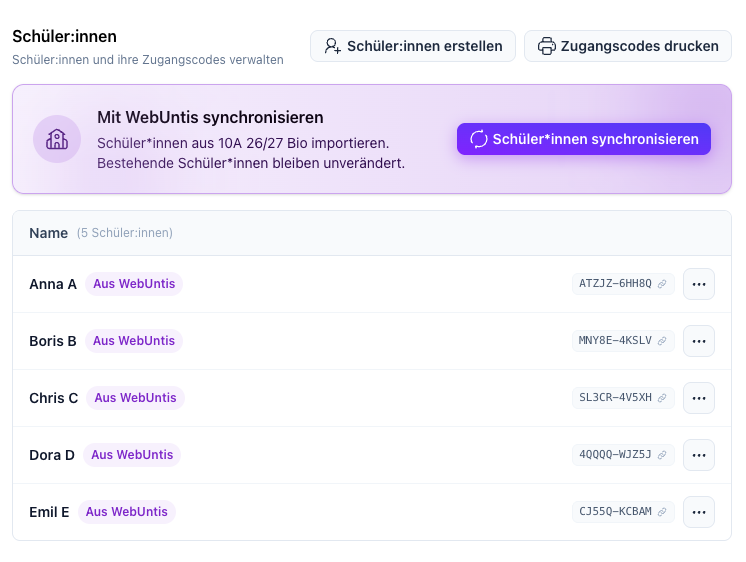
Schüler:innen können jetzt aus WebUntis nach Teachino synchronisiert werden. Damit wird die Einrichtung eines Kurses deutlich einfacher:
Keine doppelte Pflege: Schüler:innen müssen nicht mehr zusätzlich in Teachino angelegt werden.
Keine Zugangscodes mehr: Schüler:innen öffnen Teachino direkt über ihren Stundenplan in WebUntis und werden automatisch angemeldet.
So funktioniert’s: Öffne einen mit WebUntis verbundenen Kurs und wähle unter „Kurs bearbeiten“ → „Schüler:innen verwalten“ → „Schüler:innen synchronisieren“. Alternativ werden Schüler:innen automatisch angelegt, sobald sie Teachino erstmals über WebUntis öffnen.
Hinweis: Der Import funktioniert derzeit für Schüler:innen mit einem eigenen WebUntis-Benutzerkonto. Schüler:innen, die in WebUntis ausschließlich als Stammdaten-Element angelegt sind, können aktuell noch nicht synchronisiert werden.
Optimiertes KI-Feedback für Schüler:innen
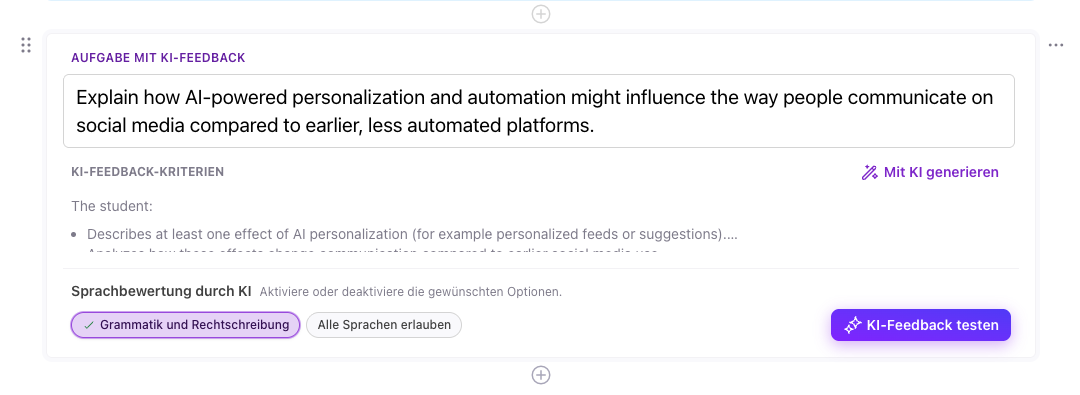
Das KI-Feedback bei offenen Fragen wurde grundlegend überarbeitet. Rückmeldungen sind jetzt stärker auf die jeweilige Aufgabe und Antwort abgestimmt. Zusätzlich kann sprachliches Feedback zu Grammatik und Rechtschreibung aktiviert werden.
AFB-gerechtes KI-Feedback: Rückmeldungen und Impulse orientieren sich stärker am jeweiligen Anforderungsbereich und unterstützen Lernende gezielt dabei, ihre Antworten fachlich zu verbessern. Abhängig von der Antwort werden Feedback, Feedforward und Feedup sinnvoll kombiniert.
Motivierendes Scaffolding: Wertschätzende, adaptive Unterstützung begleitet Lernende automatisch durch weitere Versuche und ersetzt das bisherige aktive „Tipp holen“.
Gezielte Sprachförderung: Optional kann zusätzlich Feedback zu Rechtschreibung und Grammatik gegeben werden. Bei Bedarf lassen sich auch Antworten in anderen Sprachen zulassen.
Neue Planungsansichten
Dieses Update ist Teil des großen Teachino-Sommerupdates 2026. Alle Details stellen wir dir in den kommenden Wochen auf unserem Blog vor. Wenn du unseren Newsletter abonniert hast, informieren wir dich auch per E-Mail.
Du hast Fragen? Dann besuche gerne eines unserer Webinare oder schreibe uns an [email protected]. Weitere Infos findest du auch hier in unserem Hilfecenter.
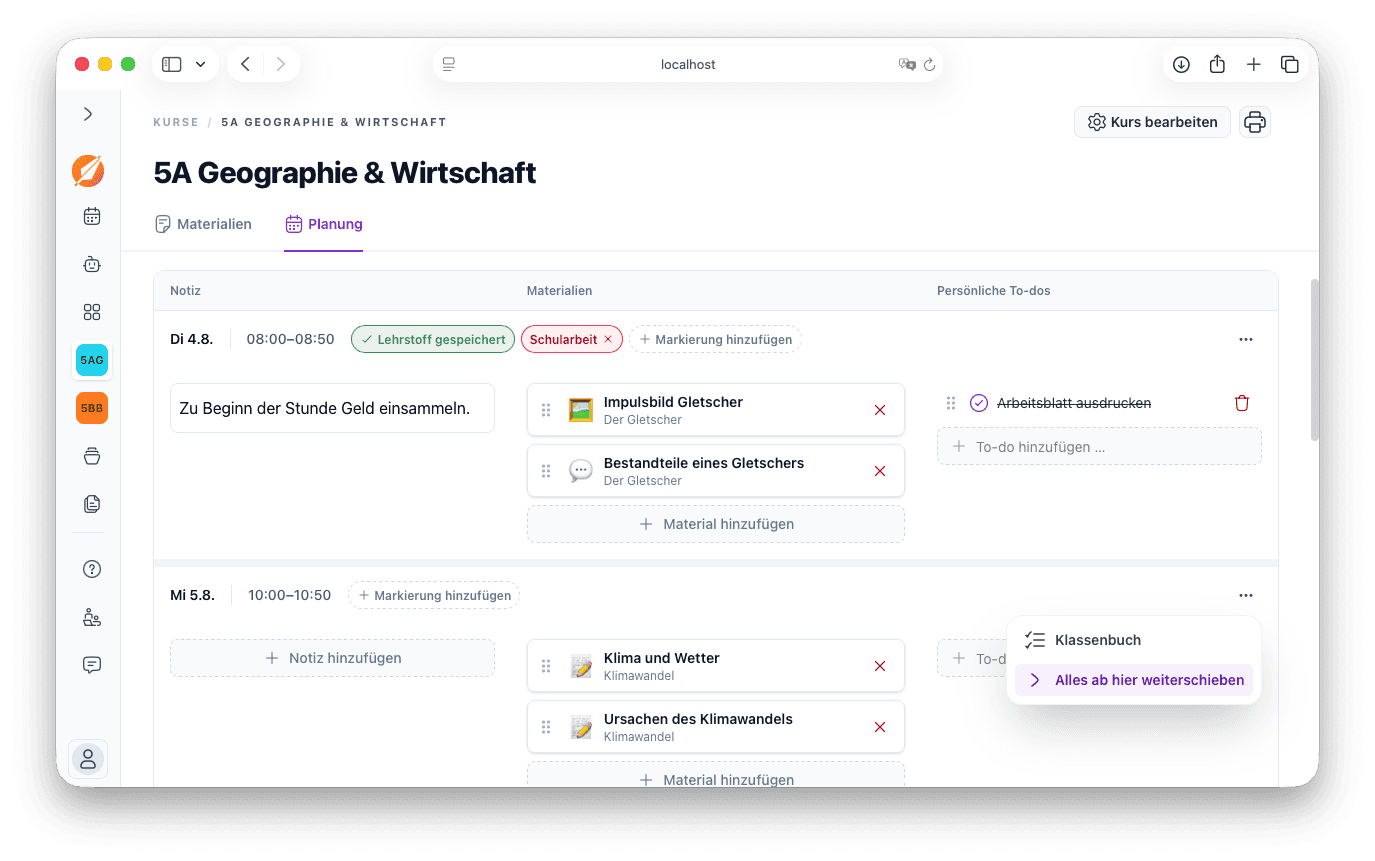
Wir haben die Stundenplanansicht vollständig überarbeitet. Zusätzlich gibt es eine neue Ansicht zur Planung des gesamten Schuljahres – mit vielen neuen Funktionen!
Neues im Stundenplan
Über „Markierungen“ können wichtige Stunden, etwa Schularbeiten oder Klausuren, direkt im Stundenplan hervorgehoben werden.
Der im Klassenbuch eingetragene Lehrstoff wird jetzt auch in Teachino gespeichert. Außerdem ist auf einen Blick ersichtlich, für welche Stunden das Klassenbuch bereits ausgefüllt wurde.
To-dos werden übersichtlicher dargestellt – insbesondere, wenn mehrere To-dos für einen Tag geplant sind.
Noten und Beobachtungen zu Schüler:innen können direkt in den einzelnen Stunden erfasst werden.
Der neue Dialog „Material hinzufügen“ zeigt übersichtlich, welche Materialien an welchem Tag bereits verwendet wurden. Materialien können dort sowohl hinzugefügt als auch entfernt werden.
Die Funktion, mehrere Notizen zu einer Stunde hinzuzufügen, ist nicht mehr verfügbar. Eine ausführlichere Verlaufsplanung kann weiterhin im allgemeinen Notizfeld festgehalten werden.
Neue Planungsansicht im Kurs
Unter „Kurs“ > „Planung“ findest du eine neue Ansicht mit allen kommenden Stunden des Schuljahres.
Über die Datumsauswahl rechts oben kannst du zu einem beliebigen Datum in der Vergangenheit oder Zukunft springen.
Alle Planungsfunktionen stehen in drei übersichtlichen Spalten zur Verfügung: Notizen, Materialien und To-dos.
Bei einem Entfall oder einer anderen kurzfristigen Änderung können alle Materialien, Notizen und To-dos gesammelt um jeweils eine Stunde in die Zukunft verschoben werden. Dadurch müssen die Inhalte nicht mehr für jede Stunde einzeln verschoben werden.
Lernfortschritt der ganzen Klasse im Blick
Dieses Update ist Teil des großen Teachino-Sommerupdates 2026. Alle Details stellen wir dir in den kommenden Wochen auf unserem Blog vor. Wenn du unseren Newsletter abonniert hast, informieren wir dich auch per E-Mail.
Du hast Fragen? Dann besuche gerne eines unserer Webinare oder schreibe uns an [email protected]. Weitere Infos findest du auch hier in unserem Hilfecenter.
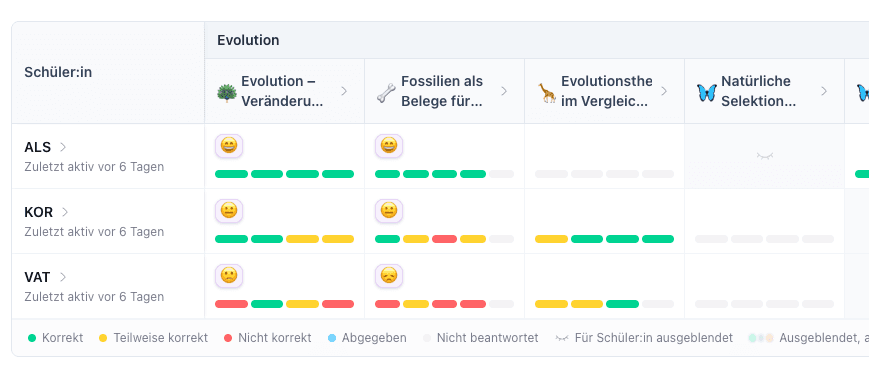
Du setzt mehrere interaktive Materialien gleichzeitig ein und möchtest den Überblick über alle Schüler:innen behalten? Unsere neue Ansicht „Lernfortschritt“ bietet dir eine übersichtliche Darstellung und praktische Möglichkeiten zur Steuerung.